
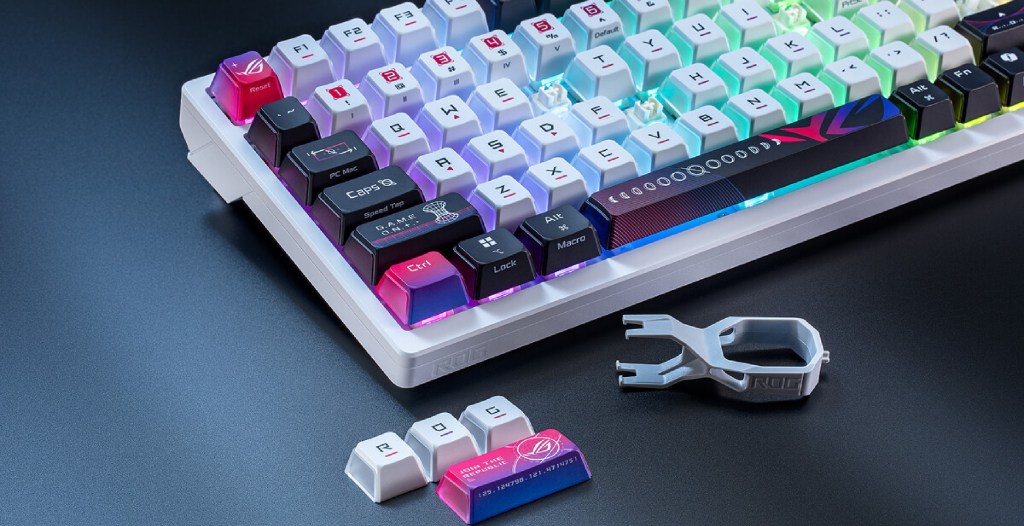
After unboxing the ASUS ROG Azoth X, I felt like I was behind the curtain at the latest NASA event. It’s premium in every regard, offering tri-mode connections, hot-swappable mechanical switches, and even an OLED display. But that premium feeling comes with a premium price tag. Retailing for a suggested MSRP of $299.99, this keyboard costs nearly as much as a gaming console.


The Asus Rog Azoth X Features a Premium Feel and Premium Sound, at a Premium Price
In the past, I’ve had the pleasure of testing out a few different keyboards from ASUS, including the ASUS ROG Falchion Ace HFX. Right off the bat, the size difference between these two keyboards is immediately noticeable. I’ve been using a 75% keyboard as my daily driver for years, as it helps save on desk space, and I’ve just generally enjoyed the aesthetic. Even if I do miss my keypad from time to time. One of my biggest gripes with the Falchion Ace HFX was the Copilot key, which makes its return here once again. Yet, due to the increased size of the board, I have yet to accidentally activate it. Not even once.
Videos by VICE
Thankfully, Armoury Crate also allows me to change the Macro of this particular key. That way, I don’t ever have to worry about Copilot popping up when I don’t want it. As of the time of this review, and for a long while afterward, this is going to stay disabled. Armoury Crate is still one of the easiest programs to use, and that doesn’t change here. The ASUS ROG Azoth X is incredibly customizable and can be changed to my exact specifications.
Even Without Hall Effect Switches, the ASUS ROG Azoth X Is a Joy To Type and Game On
If you’ve ever used the original Azoth, you can stop reading this and just head to your local store to pick this one up. You already know the quality that the board brought to the table, including a similar OLED screen. Most keyboards I’ve used in the past have a dedicated media knob, but now that I’ve messed with this silly little screen, I don’t think I can go back. For the price, I do wish that the ASUS ROG Azoth X included Hall Effect switches, but the Snow and Storm V2 Switches are some of the best I’ve experienced in quite some time.
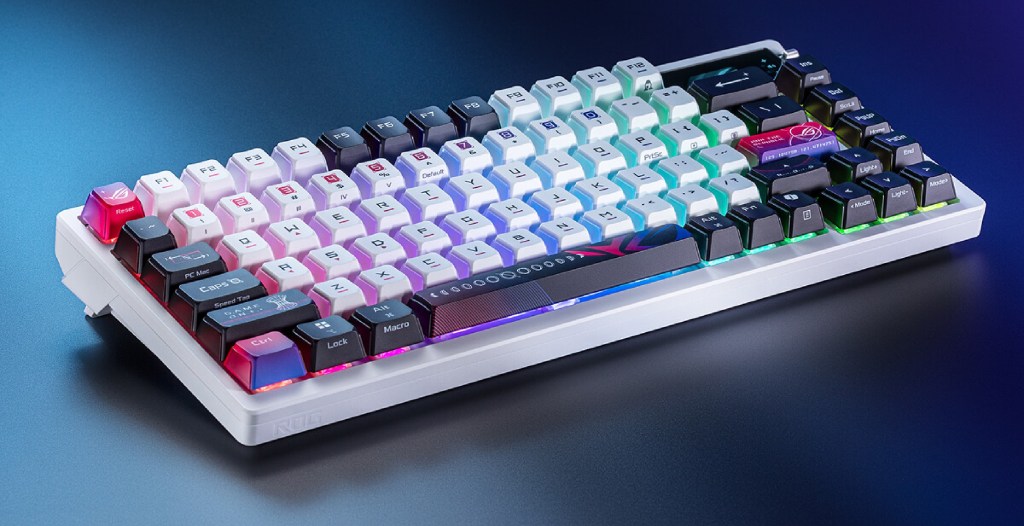
Typing is incredibly accurate, and the satisfying clackiness of the switches is also a joy to experience firsthand. Yes, as with many mechanical keyboards, this is yet another clacky, clicky board. Rather than aiming for noise, there’s still enough sound to keep typers and players happy without bothering everybody around them. It’s creamy, and the astrological vibes look utterly fantastic. Three-way pudding tops also give the keys a nice look without being too horrifyingly bright, but you can change the brightness of the keys via Armoury Crate if you want them to be brighter or dimmer.
ASUS ROG Azoth X Gaming Keyboard Tech Specs
| Keyboard Features | Technical Specifications |
|---|---|
| Switch Type | ROG NX Mechanical Switch (Snow V2 or Storm V2) |
| Connectivity Types | USB 2.0 (Type C/Type A), Bluetooth 5.1, RF 2.4GHz |
| Lighting | RGB Per Keys |
| Aura Synch? | Yes |
| Anti-Ghosting | N Key Rollover |
| Macro Keys | All Keys Programmable |
| USB Report Rate | 1000Hz Polling Rate |
| Cable | 2M USB Type A to C Braided Cable |
| OS | Windows 11 / macOS 10.11 or Later |
| Software | Armoury Crate |
| Dimensions | 325.4mm x 136.2mm x 40mm |
| Weight | 1600g (including Wrist Rest) |
| Color | White w/ Astrological Keycaps |

The Asus ROG Azoth X Isn’t Just a Pretty Face. It’s Got Plenty Going on Under the Hood, Too
The ASUS ROG Azoth X comes with two types of available switches. I tested the Snow V2. This switch features a 1.8mm Actuation point, 40gf of Initial Force, and 53gf of Total Force. This is a very responsive keyboard. Pair it with the Speed Tap mode that comes standard with this type of board, and you’ll feel unstoppable. Seeing how quickly keyboards are advancing is wild, but there are a few things to know about the Azoth X that may keep it behind the pack compared to even some of its contemporaries. Out of the box, the ROG Azoth X has a 1000Hz polling rate. The ROG Falchion Ace HFX, on the other hand, has an 8000Hz polling rate. This may sound like a massive difference, but I’m here to help on that front.
If you absolutely need that advanced polling rate, you can purchase and install the ASUS ROG Polling Rate Booster. This helps in both wired and wireless modes, boosting this keyboard from that 1000Hz to 8000Hz polling rate. But here’s the thing. The 1000Hz polling rate is 1 millisecond of delay. Nothing noticeable by any means, and much more advanced than the vast majority of keyboards on the market. An 8000Hz polling rate is 0.125 milliseconds of delay. It sounds like a lot, but really isn’t. So, compared to a large number of keyboards on the market, the Azoth X is still incredibly fast, competitive, and usable in any type of game. From OSU to Counter-Strike, you’ll be more than set.
The Hot Swappable Switches and Easy-to-Access Parts Make the Azoth X a Customizer’s Dream
The first keyboard I ever got truly invested in was the Redragon K552. I tore that thing apart and started customizing it to my heart’s content. Adding in sound-dampening padding, new switches, and many other little things, I made that keyboard my own. But trying to get that thing torn apart? It was kind of a nightmare. Putting it back together, especially with padded foam inside, was even worse. That’s why I was surprised to see how easy it was to tinker with the ASUS Azoth X. Hot-swappable switches, south-mounted PCB, five dampening plates, gasket mounts, and so much more await eager tinkerers. It’s a beautiful sight to see torn apart, and even more satisfying to put back together.
The Asus Rog Azoth X Is a Mechanical Masterpiece, Blending Beauty and Brawn Into a Bite-Sized Package
No matter what you’re using the ASUS ROG Azoth X for, there’s no denying that it’s one of the most premium-feeling, looking, and sounding boards on the market. The lack of hall effect switches is a little disappointing, especially considering the price, but if you can look past that for some incredibly solid mechanical switches? You may find that this could be your Lifetime Board, one that you’ll use until either you or the keyboard croaks. I’m hoping that’s the case here, as this is one of the most comfortable compact keyboards I’ve ever had the privilege of reviewing.
To be fair, there are other boards out there with many of the same features for less money. But if you’re looking for something that has both style and profile, then you can’t go wrong with the Azoth X. Just like its design, its feature set and feel are completely out of this world.
Verdict: Highly Recommended

The ASUS ROG Azoth X is available now for a suggested MSRP of $299.99. A sample was sent by ASUS for the purpose of review. Reviewed on PC and PlayStation 5.
More
From VICE
-

WWE -

Screenshot: Peacock -

Screenshot: Star Wars -

Dick Van Dyke (Photo by Axelle/Bauer-Griffin/FilmMagic)
